Promotion Windows
Promotion windows are a Kargo Enterprise feature, available in Kargo v1.12 and
above. The promotionWindows API is present in Kargo OSS for compatibility, as
it is for other Enterprise-only fields such as
autoRollback, but the schedule
is only ever evaluated and enforced by Kargo Enterprise. In OSS the field is
accepted and ignored.
Promotion windows let you control when Promotions may be created for a
Stage. A window is either an allow window, which permits promotions only
while it is active, or a deny window (a freeze), which forbids promotions
while it is active. You can use them to restrict promotions to business hours,
to a weekly release slot, or to freeze an environment during an incident or a
change-control blackout.
Windows are configured on
ProjectConfig (for a
single Project) and on
ClusterConfig (across
Projects). A Stage's effective window status is the union of every window
that matches it, drawn from both.
How It Works
Promotion windows gate the creation of a Promotion, not its execution.
- When a window is closed for a
Stage, an admission webhook rejects newPromotions for thatStage. A person promoting manually receives a synchronous, descriptive rejection; automatic promotion is denied and simply retried on a later reconciliation. - A
Promotionthat was already running when a window closes is never interrupted — it runs to completion. - A
Promotionthat was admitted while the window was open but is stillPendingwhen the window closes is deleted by an Enterprise controller, so it does not dispatch inside a freeze. See Effect on Promotions below.
Because promotions are denied at creation time, no backlog of pending
Promotions accumulates during a freeze. When a window reopens, automatic
promotion creates a single Promotion for the newest eligible Freight —
intermediate versions are coalesced rather than replayed.
Configuration
Project-Level Windows
Windows on a ProjectConfig apply only within that Project. The example below
freezes all promotions in the Project during a one-day change blackout, and
separately restricts the prod Stage to a weekday business-hours window:
apiVersion: kargo.akuity.io/v1alpha1
kind: ProjectConfig
metadata:
  name: example
  namespace: example
spec:
  promotionWindows:
  # A one-shot freeze covering every Stage in the Project.
  - name: end-of-year-freeze
    kind: Deny
    description: "Company-wide change freeze; see CHG-4821"
    dtstart: "20261224T000000"
    dtend: "20261227T000000"
  # A recurring business-hours window that constrains only the prod Stage.
  - name: prod-business-hours
    kind: Allow
    stageSelector:
      name: prod
    rrule: FREQ=WEEKLY;BYDAY=MO,TU,WE,TH,FR
    dtstart: "TZID=America/New_York:20260105T090000"
    dtend: "TZID=America/New_York:20260105T170000"
Cluster-Level Windows
Windows on the ClusterConfig apply across Projects. They support the same
fields as ProjectConfig windows, plus projectSelector to narrow which
Projects a window covers (a cluster-wide window omits it). A cluster-level
window is useful for an organization-wide "stop the line" freeze or for a
release schedule that every Project shares:
apiVersion: kargo.akuity.io/v1alpha1
kind: ClusterConfig
metadata:
  name: cluster
spec:
  promotionWindows:
  # Freeze production promotions across every Project.
  - name: global-prod-freeze
    kind: Deny
    stageSelector:
      name: glob:prod-*
    dtstart: "20260701T000000"
    dtend: "20260702T000000"
  # Restrict a group of Projects to a weekly release slot.
  - name: friday-release-slot
    kind: Allow
    projectSelector:
      matchLabels:
        team: payments
    rrule: FREQ=WEEKLY;BYDAY=FR
    dtstart: "TZID=America/New_York:20260102T130000"
    dtend: "TZID=America/New_York:20260102T170000"
A cluster may have at most one ClusterConfig resource, and it must be named
cluster. See
Cluster Level Configuration.
Promotion window fields
Each entry in promotionWindows describes one window:
| Field | Required | Description |
|---|---|---|
name | Yes | A symbolic name for the window, unique within the list. It appears in rejection messages and events. |
kind | Yes | Either Allow or Deny. |
description | No | Human-readable text explaining the window: a reason, an author, or a link to a change ticket. |
disabled | No | When true, the window is skipped when evaluating the window status. Defaults to false. Useful for temporarily turning a window off without deleting it. |
stageSelector | No | Selects the Stages the window applies to. When omitted, it applies to all Stages in scope. See Selecting Stages. |
projectSelector | No | ClusterConfig only. Selects the Projects the window applies to. When omitted on a ClusterConfig window, it applies to all Projects. It is rejected on ProjectConfig windows, where the Project is implicit. |
rrule | No | An RFC 5545 recurrence rule (e.g. FREQ=DAILY) that makes the window recurring. When omitted, the window is a one-shot interval. See Scheduling. |
dtstart | No | The window's start as an iCal date-time, with an optional TZID= prefix carrying a time zone. See Scheduling. |
dtend | No | The window's end, in the same format as dtstart. With rrule, dtend − dtstart is the duration of each occurrence. |
Selecting Stages
stageSelector (and projectSelector on ClusterConfig windows) reuses the
same PromotionPolicySelector used by
promotion policies,
so it matches by exact name, glob or regex pattern, or Kubernetes label
selector:
promotionWindows:
- name: prod-freeze
  kind: Deny
  stageSelector:
    # Exact name, or "glob:prod-*", or "regex:prod-.*"
    name: glob:prod-*
    matchLabels:
      environment: production
  dtstart: "20260701T000000"
  dtend: "20260702T000000"
When both a name pattern and a label selector are given, a Stage must match
both. When stageSelector is omitted entirely, the window applies to every
Stage in scope.
Pattern and label matching carry the same security considerations as they do for
promotion policies: a user who can create or label Stages could craft names or
labels to fall outside an intended freeze. Using exact names is the most
predictable option.
Scheduling
A window's timing is expressed with iCal-style values:
dtstart/dtendare iCal date-times, formattedYYYYMMDDThhmmss. An optionalTZID=<zone>:prefix carries an IANA time zone, e.g.TZID=America/New_York:20260105T090000. When noTZID=is given, the time is interpreted as UTC. Supplying a zone lets a window follow local working hours across daylight-saving changes rather than drifting by an hour.rruleis an optional RFC 5545 recurrence rule. When omitted, the window is a one-shot interval — it occurs exactly once, fromdtstarttodtend. When present, the window recurs:dtstartanchors the first occurrence,rruledefines the cadence, anddtend − dtstartfixes the duration of every occurrence.
dtend must be after dtstart.
Some common patterns:
# One-shot freeze: a fixed interval, no recurrence.
- name: incident-freeze
  kind: Deny
  dtstart: "20260315T000000"
  dtend: "20260316T000000"

# Daily off-hours allow window (17:00–08:00 the next day, New York time).
- name: nightly-window
  kind: Allow
  rrule: FREQ=DAILY
  dtstart: "TZID=America/New_York:20260101T170000"
  dtend: "TZID=America/New_York:20260102T080000"

# Weekly Friday-afternoon release window.
- name: friday-release
  kind: Allow
  rrule: FREQ=WEEKLY;BYDAY=FR
  dtstart: "TZID=America/New_York:20260102T130000"
  dtend: "TZID=America/New_York:20260102T170000"
Allow and Deny Precedence
A Stage's effective window status is the union of all matching windows. At any
instant, the status is closed (promotions prohibited) when:
- There is a matching
Denywindow currently active (current time inside the window bounds) OR - There are matching
Allowwindows, none of which are currently active
Inversely, the scedule is open (promotions permitted) when:
- There is no matching
Denywindow currently active AND - There is no matching
Allowwindows, or at least one matchingAllowwindow currently active
In other words:
- Windows constrain only the
Stages they match. - Deny wins. An active
Denywindow always closes theStagewindow status, regardless of anyAllowwindows. A freeze is simply aDenywindow. - Allow windows constrain all promotion outside the window. If any
Allowwindow matches aStage, thatStageis closed except while one of itsAllowwindows is active. - No matching windows means always open. A
Stagethat no window matches is never gated.
For example if we have an Allow window permitting daily from 09:00 to 17:00, like this:
- name: allow-workhours
  kind: Allow
  rrule: FREQ=DAILY
  dtstart: "TZID=America/New_York:20260101T090000"
  dtend: "TZID=America/New_York:20260102T170000"
And we have a Deny window blocking promotions at specific day, like this:
- name: incident-freeze
  kind: Deny
  dtstart: "20260315T000000"
  dtend: "20260317T000000"
Then the Stage window status will be open between 09:00 and 17:00 only on the days when it's not blocked:

Using Promotion Windows in the Kargo UI
Kargo Enterprise adds a promotionWindows field on ProjectConfig
and ClusterConfig described above — the UI is an alternative editor for that
configuration, not a separate mechanism.
Where to Find It
There are two views, one per scope:
| Scope | Where |
|---|---|
| Cluster promotion windows | /settings/cluster-config/promotion-windows, or in cluster |
| Project promotion windows | /project/<project>/settings/project-config/promotion-windows, or in a Project's |
The cluster view edits the one ClusterConfig named cluster; the Project view
edits that Project's ProjectConfig. The only difference between them is that
the cluster view additionally exposes projectSelector.
Calendar and List Views
Each view offers two tabs:
Calendar
The
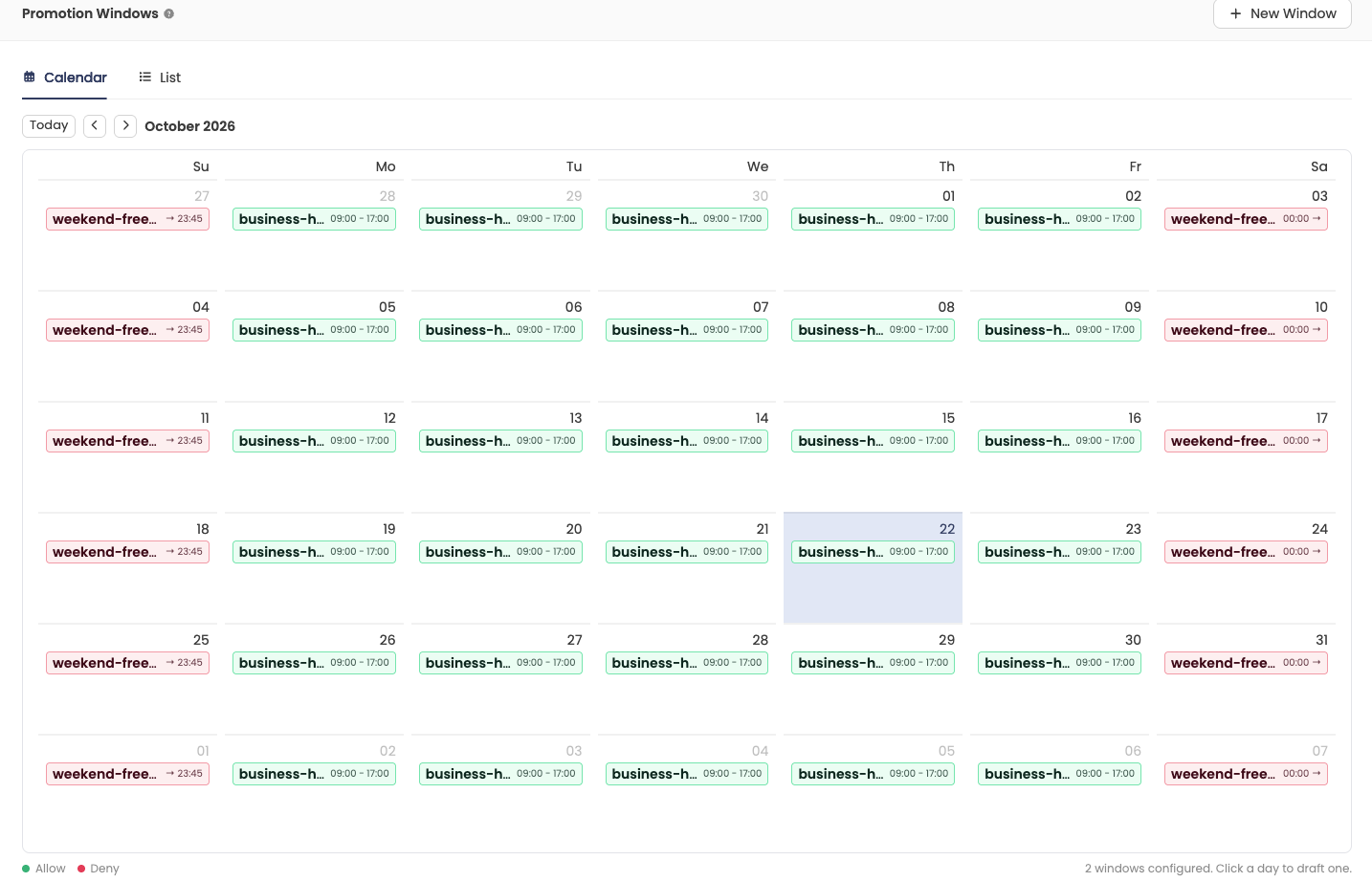
Each entry resolves dtstart, dtend, rrule and the time zone into the
concrete occurrences that fall in the displayed month, so you see the schedule
the rule actually produces rather than the rule itself. Green entries are
Allow windows, red are Deny, and dashed entries are disabled windows.
Clicking an occurrence opens the window that produced it for editing; clicking an empty day starts a new one-hour window drafted on that day.
The calendar renders each window's own occurrences. It does not compute a
Stage's net window status, so where an Allow and a Deny occurrence
overlap, the precedence rules still decide the
outcome — Deny wins. Consult a Stage's
status.promotionWindowStatus for its effective state.
List
The
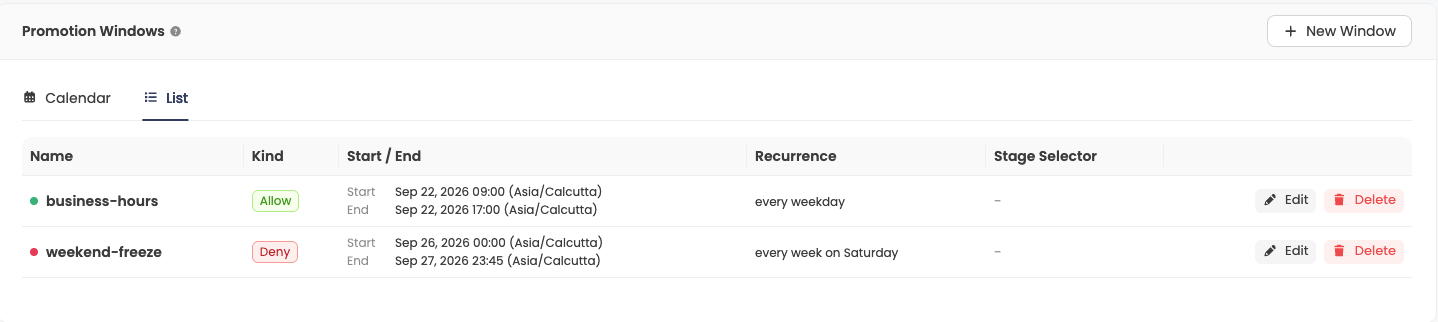
Creating and Editing a Window
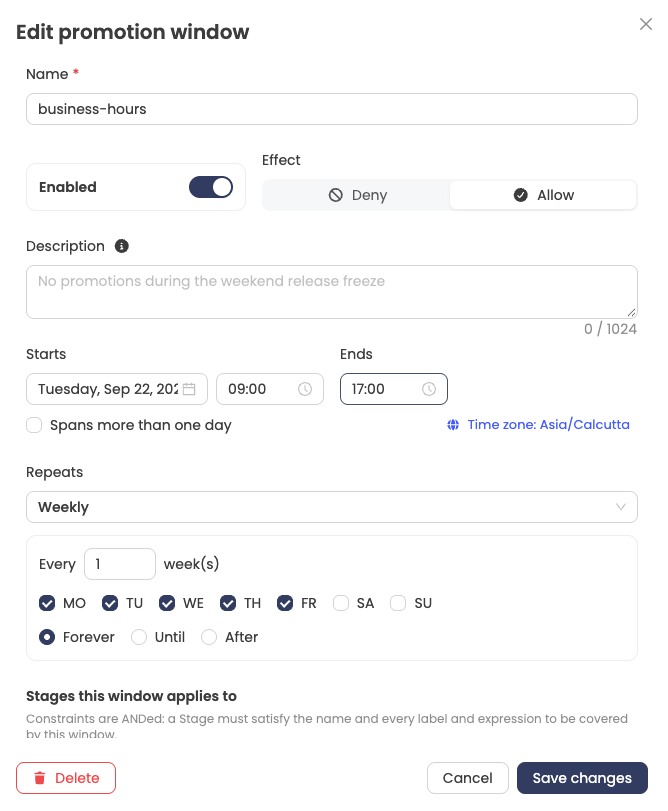
Saving writes the complete window list back to the ProjectConfig or
ClusterConfig immediately — there is no separate save step on the page — and
the UI confirms with a
Restricting Scope
Both selectors start at "Every Stage" (and "Every Project" in the cluster
view), which leaves the corresponding field unset.
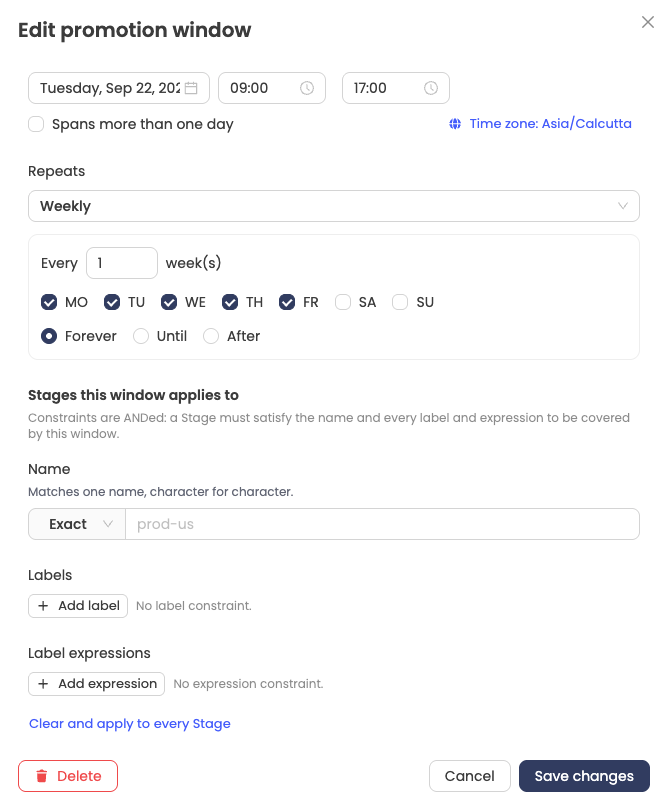
Name — a name pattern, with the dropdown choosing the matching mode:Exact for a literal name,glob: for shell-style wildcards such asprod-*, orregex: for an RE2 expression (unanchored by default).Labels — key/value pairs that becomematchLabels.Label expressions — key, operator and values, becomingmatchExpressions. The values field is disabled for operators that take none, such asExists.
Constraints are ANDed: a Stage must satisfy the name pattern and every label
and every expression to be covered by the window.
Pattern and label matching in the UI carries the same security considerations described in Selecting Stages. Exact names remain the most predictable option.
Effect on Promotions
Promotion windows gate all promotions uniformly — automatic, manual, and
auto-rollback. There is no class
scoping; a closed window blocks every kind of Promotion for the Stage,
including rollbacks and hotfixes. To promote during a closed window, an
administrator must edit or remove the responsible window (governed by RBAC on
ProjectConfig / ClusterConfig).
Manual promotion. Creating a Promotion for a Stage whose window status is
closed is rejected at admission with a Forbidden error naming the responsible
window and, where one can be determined, the time promotions resume:
promotion of Stage "prod" is not permitted at this time:
Promotion freeze "end-of-year-freeze" is active;
promotions resume at 2026-12-27T00:00:00Z
Nothing is persisted — there is no Pending object to clean up, and the
promoter decides whether to wait or to escalate.
Automatic promotion. When a Stage window status is closed, no automatic Promotions
will be created. Kargo only logs attempts with DEBUG log level.
When the window reopens the successful promotion attempt will succeed for the newest eligible Freight.
A scheduled open (or an administrator lifting a freeze) takes effect within a few minutes, on the
Stage controller's normal resync.
Auto-rollback. Automatic rollbacks are gated the same way. A short freeze resumes a pending rollback automatically when it reopens; a long freeze may outlast the rollback controller's recovery horizon, handing recovery to a human — consistent with the intent of the freeze.
Because automatic promotions happen in reconcile loop, there is no audit events indicating
a failure to promote when the window is closed. Kargo only logs those with DEBUG level.
One should check the Stage status field promotionWindowStatus to investigate stages which appear "stuck".
The window-close sweep. A Promotion can be admitted while a window is open
and then sit Pending past the moment the window closes — for example when the
Stage controller defers dispatch until the previous Freight finishes
verifying. To keep such a Promotion from dispatching inside a freeze, an
Enterprise controller deletes still-Pending Promotions for the
affected Stages when a window closes, recording a PromotionDiscarded event
for the audit trail. Deletion (rather than abort) leaves nothing behind, so
auto-promotion cleanly recreates a Promotion for the newest Freight when the
window reopens.
A Promotion that the Stage controller dispatches at the very moment the
sweep runs wins the race and runs to completion, like any already-running
Promotion. This is bounded by a single promotion's duration.
Stage Status
Kargo Enterprise reports each Stage's current window state in
status.promotionWindowStatus, so a user interface can explain a freeze
before a user runs into it. For a Stage that is currently frozen:
status:
  promotionWindowStatus:
    closed: true
    reason: Promotion freeze "end-of-year-freeze" is active
    nextOpen: "2026-12-27T00:00:00Z"
For a Stage that is currently open but has an upcoming freeze:
status:
  promotionWindowStatus:
    closed: false
    nextClose: "2026-12-24T00:00:00Z"
    nextCloseReason: Promotion freeze "end-of-year-freeze" begins
The fields are:
| Field | Description |
|---|---|
closed | true when the configured windows currently forbid promotion of the Stage. |
reason | Set whenever closed is true; a human-readable explanation naming the responsible freeze. It carries the same explanation as the admission rejection. |
nextOpen | When promotions are next expected to be permitted. Optional even while closed — its absence means no reopening is known (e.g. an elapsed one-shot Allow window), i.e. "frozen, with no known end". |
nextClose | When promotions are next expected to become forbidden. Meaningful only while closed is false; lets a client warn of an approaching freeze. |
nextCloseReason | Set whenever nextClose is set; names the freeze that will take effect. |
promotionWindowStatus is advisory. It is only as current as the last
reconciliation of the Stage, so clients must not treat it as authorization.
Admission remains the sole arbiter of whether a given Promotion is permitted;
the status exists to explain a freeze, not to decide anything.
Limitations
- Rollbacks and hotfixes are gated by a closed window too; there is no built-in bypass. Break-glass is an administrator editing or removing the window.
- A
Promotionalready running when a window closes is never aborted. - Missed intermediate versions are not replayed. At reopening, auto-promotion
coalesces to the newest
Freight; the intermediates were never created. - Window closes take effect promptly (the Enterprise controller wakes at
each window boundary). Window opens for automatic promotion take effect on
the
Stagecontroller's normal resync, within a few minutes.